
1. Abion
  2. /
  3. Guide
  4. /
  5. Clear mail – mail03.portsit.se


If your account exceeds the maximum limit (default 100 MB), the mail server will block incoming emails to your inbox. So it may be helpful to clear emails if your space is getting low.

If you use an e-mail program where you have your account set up as POP, there is a setting that saves copies on the server for a specific number of days. If you feel that your account is often full, you can either set it up to save copies for fewer days or increase your space.

Go to a folder containing mail you want to clear. Select the emails you want to delete, and then click Delete.
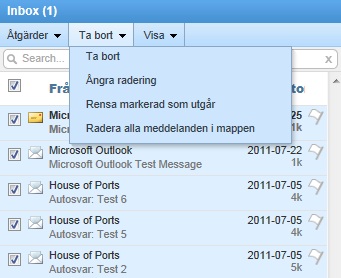
Delete_mails


After you delete the emails, they will end up in your Deleted folder. If you want to free up space, you must also remove the emails from the Deleted folder. You do this the same way:
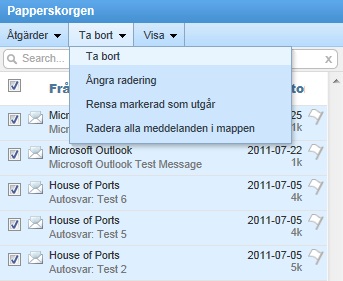

purge_messages


jonathan.borg_-1

Author

Jonathan Borg

Technical Solutions Specialist

Email me

Do you want to know more about Exchange and other solutions? Contact us and we will help you!

Related guides

Matt Serlin - Senior Director of Domain Management US
Welcoming Matt Serlin to Abion: Strengthening Our US Presence in Domains and Digital Identity
Announcements / Press releases
Domains
We speak with Matt Serlin about his new role at Abion, the growing importance of domain management in the US, and...
Abion Thumbnail dotBrand SEO
Practical SEO Guide to Switching to Your dotBrand Domain
Domain Management
A practical guide to migrating to a dotBrand domain while minimising SEO impact and protecting search visibility.